|




|
Editing
and updating an existing site
You
can use Dreamweaver to copy an existing remote site (or any branch
of a remote site) to your local disk and edit it there, even if
you didn't use Dreamweaver to create the original site.
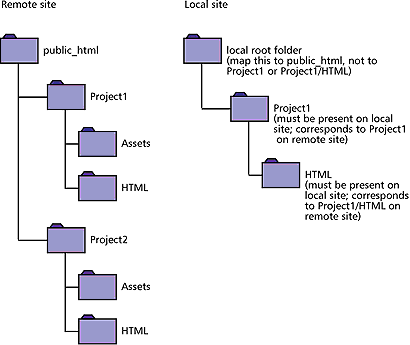
Note that even if you
intend to edit only part of the remote site, to avoid problems
you must locally duplicate the entire structure of the relevant
branch of the remote site, from the remote site's root folder
down to the files you want to edit. For example, if your remote
site's root folder, named public_html, contains two folders, Project1
and Project2, and if you want to work only on the HTML files in
Project1, you don't need to download the files in Project2, but
you must map your local root folder to public_html, not to Project1.
|
|